Homepage and visual direction
The main site uses a dark charcoal theme with cyan accents. Its navigation separates Home, Customise, Community and Connect. The hero pairs the project introduction with a recreated Series 1 dashboard: smooth dark plastic fascia, black bezel rims and a textured upper hood.
The startup demonstration fades from black, simulates door-opening light, holds the Supra splash for two seconds, then reveals three gauge screens with independently calibrated needle sweeps. Fuel and coolant share one screen. The displays remain on after startup.
The startup begins with TRD 320, demonstrates the warning-equipped Spectrum tuning set, then smoothly cycles designs and returns to TRD. Visitors can select other sets, enlarge the dash, replay/pause/skip startup, or choose a different startup preset. Original Concept is the owner’s original TRD set. Other sets include stock S1/S2, USDM, automatic, neon, anime, retro digital and CAN-inspired displays.
Splash-logo upload, size and restore controls affect this browser’s demo only. Reduced-motion preferences receive a static view. The decorative gauge rows below the splash controls have been removed.
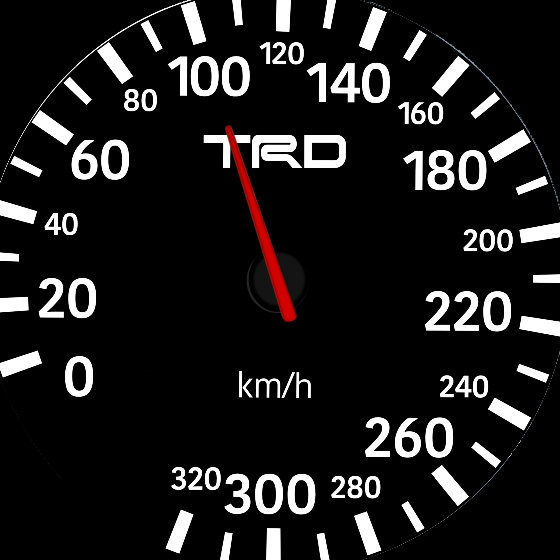
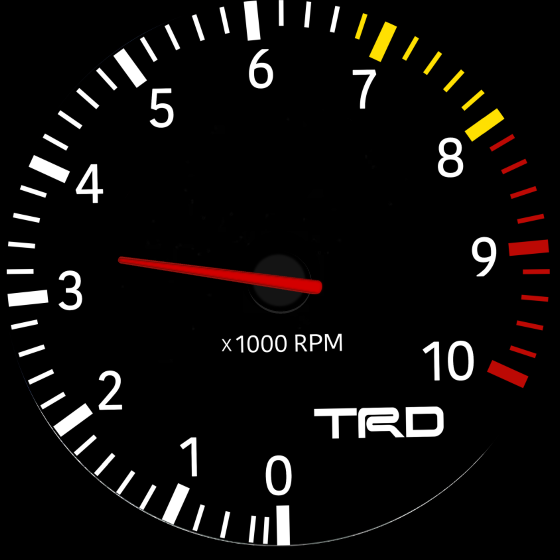
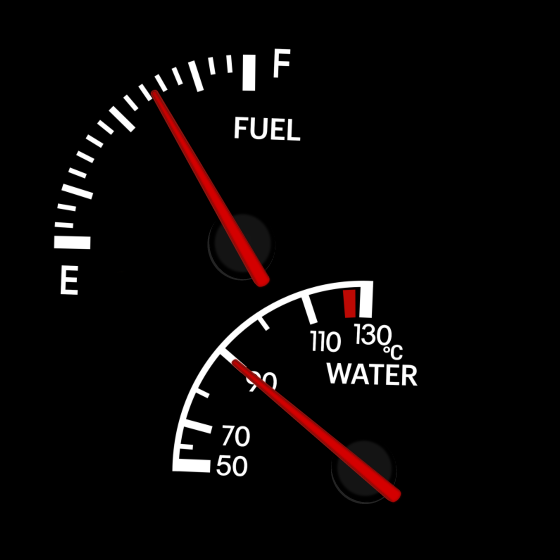
The build so far — 1 November 2026 · PCB revision 7444
The project moved from an Orange Pi 6 Plus to a custom three-node PCB and a planned 3D-printed housing. Each ESP32-P4 display node has 32 MB flash and 32 MB PSRAM; an STM32 handles vehicle signals and an ESP32-C6 provides wireless/service hardware. The checked current layout includes side-entry vehicle headers, protected dry-contact controls and a switched 5 V fan output.
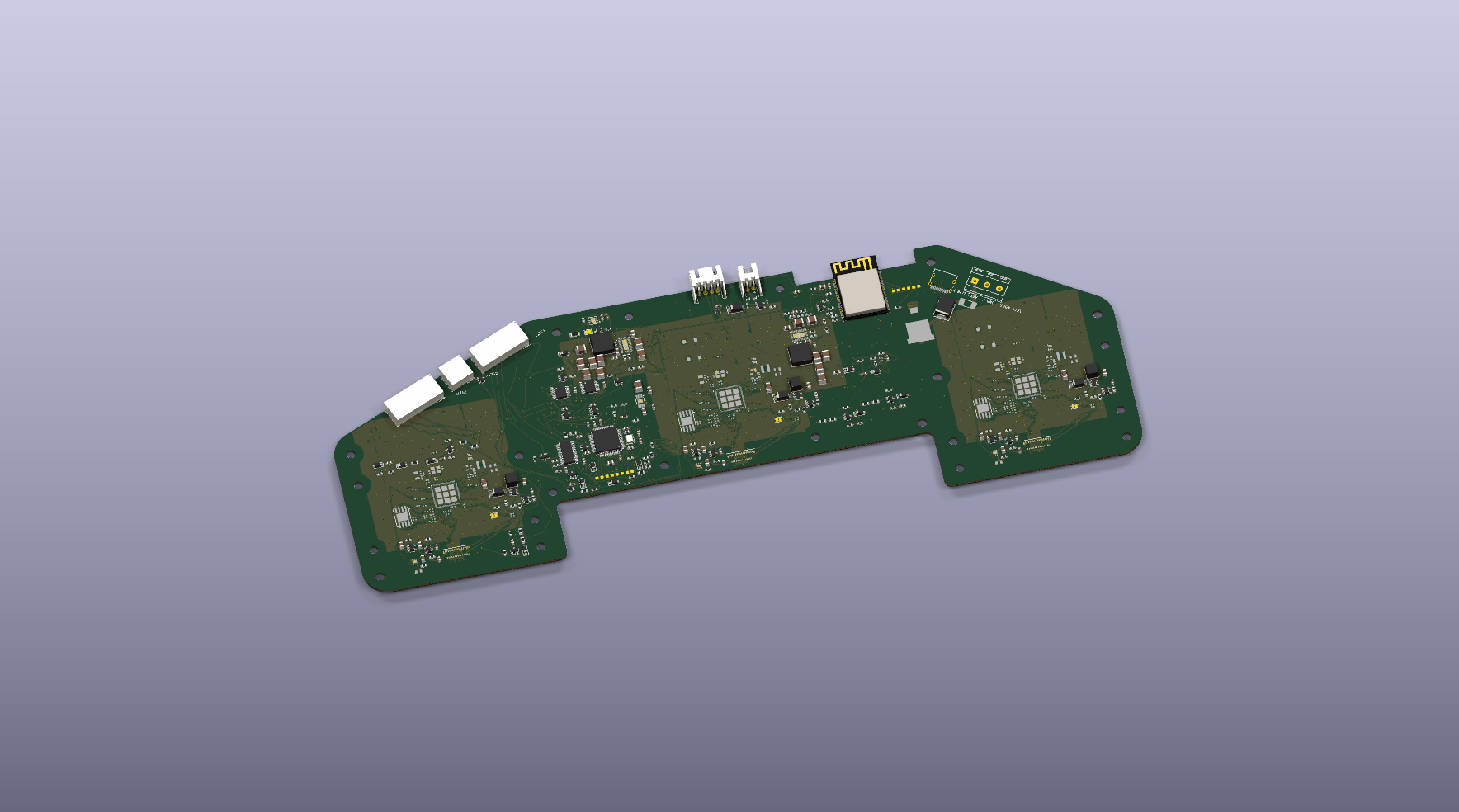
Revision 7444 has 775 fitted BOM entries. Saved native checks report zero PCB errors, PCB warnings, opens, schematic mismatches or ERC errors. All 112 original via-entry warnings have been resolved; 34 documented schematic warnings remain. The latest read-only functional review matched 715 nets and 2,483 pin assignments.
What changed since the first JLCPCB submission?
The received 14 October parts-matching bundle contained 758 fitted BOM entries. All remain present. Twelve protected-controls parts were added and five existing connectors were included explicitly, bringing the current list to 775 (769 SMT and six THT). Vehicle headers are now side-entry, CAN/door sits between the main plugs and controls sit left of the fan. C1 lighting and C9 oil sensing remain connected; C10 is intentionally isolated. Pin-reference notes, via-entry routing and printable silkscreen were corrected.
Current files also include checked same-value resistor selections, 60 TDK ordering-code updates and clearer component names. JLCPCB reviewed the earlier 7311 upload; current 7444 has not been submitted. Factory/model/process decisions, final sourcing, installed fit, firmware and hardware validation remain open. Production and assembly are unapproved.
1200-nit screens — in testing
The owner is evaluating Wisecoco's brighter 4-inch 720 × 720 MIPI display option. The supplier lists 1200 cd/m² typical brightness; it has not been measured on this cluster. The exact panel pinout, backlight requirements, initialization, cable/carrier fit and three-screen power/heat still need checks. No brighter-panel component or connector changes have been made to 7444. Supplier screen specification.
Practical P4 programming/recovery access, reconciliation of older firmware pin definitions and the factory speed/SPD forwarding strategy remain next steps. Complete firmware, simultaneous startup, sender, thermal and vehicle testing are still required. Series 1 plug-and-play remains the goal; the Series 2 harness adapter is in development. The private engineering review includes the current board, detailed first-submission comparison, screen checks and latest functional findings.
Customise — Gauge Studio
A desktop-first editor works on 720 × 720 circular displays. Users can upload PNG faceplates and their own needle artwork, position needle pivots and calibrate value/angle marks with piecewise interpolation for uneven factory scales.
A screen can contain multiple independently named analogue or digital instruments, each with its own calibration. The editor includes reusable scale artwork, symbols, editable text, fonts, colours and sizing, optional odometer/automatic indicators, simulation, undo/redo, browser autosave and project export/import.
Start by creating a blank gauge, editing an existing copy or continuing the current draft. Seven steps share one canvas: Background; Readings & scales; Needles & calibration; Warnings & symbols; CAN & graphs; Animation; Test & save. Going backwards retains existing items. Opening another design first backs up the draft locally.
Editable Spectrum, Lambda Core and Pullscope starters are available on the Customise entry screen and in Community. Step 5 adds RPM/load sample maps, scrolling history graphs with a comparison line, progress arcs and digital data cards. Each item has its own channel, position, size and colour thresholds. Select it on the canvas or in the right-hand item list to edit it.
A simulated 12-second pull tests the displays and warning rings. Maps average recorded lambda error or closed-loop correction by RPM/load; they do not retrieve or edit ECU fuel-table cells. Demo samples can be downloaded as a clearly labelled CSV. Layouts persist in .sdface files, but samples are session-only. Real CAN decoding, hardware logging and installing these new widgets still require firmware work.
Optional night glow is previewed in the browser. A local video can be mapped to a simulated gauge value, with a final-frame hold or bounce above a chosen threshold. Video files must be selected again after reload; settings alone are saved/exported. On-device animation, glow and media packaging still require firmware work.
Community designs
The gallery includes editable Neon Circuit, Midnight Pass and Retro Amber starter families, with speed, RPM, fuel and coolant variants. Retro Amber uses numeric readings rather than needles.
The KM Systems submission form accepts .sdface gauge files only, checks them locally and converts embedded artwork to PNG. Server validation, bounded PNG decoding, abuse verification and a fixed private Dropbox destination are implemented. Direct uploads remain disabled until the dedicated Dropbox credentials and Turnstile configuration are connected. Selecting a file does not upload it. The old hosted Dropbox request is no longer linked from the website.
Publication stays separately reviewed. The build gate validates each local .sdface project and PNG preview before including it in the community gallery. There is no automatic public Dropbox folder listing.
Connection — prototype, not finished functionality
The Connect page describes planned BLE discovery/settings and Wi-Fi provisioning, with larger face packages and firmware updates over Wi-Fi. Browser code currently provides discovery and a basic GATT connection attempt only; it does not yet transfer settings, designs or firmware.
The live site's current browser permissions policy disables Bluetooth access. Matching device firmware, an approved browser policy, authenticated transfers, recovery and update validation are still required. Wi-Fi/Android Auto coexistence has not been verified on the hardware.
The customiser separates three protected factory families (Stock, TRD and Original Concept) from a browser-local custom-face list. Factory sources cannot be overwritten or deleted through custom-list actions. Odometer visibility, automatic gears and S1/S2 auxiliary layout are selectable when creating a custom copy. Device-side read-only factory storage and phone-independent recovery are specified but not integrated into firmware.
Editable .sdface export embeds PNG artwork. A server-side ECDSA P-256 signature produces .sdpack development packages, always assigned to custom storage; the browser checks their signatures before download. This is not yet a hardware-installable format. Video, night glow and the new editable CAN widgets are rejected for installation until supported by firmware. A signed or factory-derived face is not a road-safety approval.
The intended architecture keeps vehicle signals and gauge rendering on the cluster, with the phone used for configuration rather than as a required source of live gauge operation.
Review scope
This overview supports reviews of the concept, copy, feature organisation and development gaps. For precise visual feedback, use the interactive site in a JavaScript-capable browser or provide screenshots. The site is a development preview, not a production-ready vehicle instrument or a claim of certified compatibility.